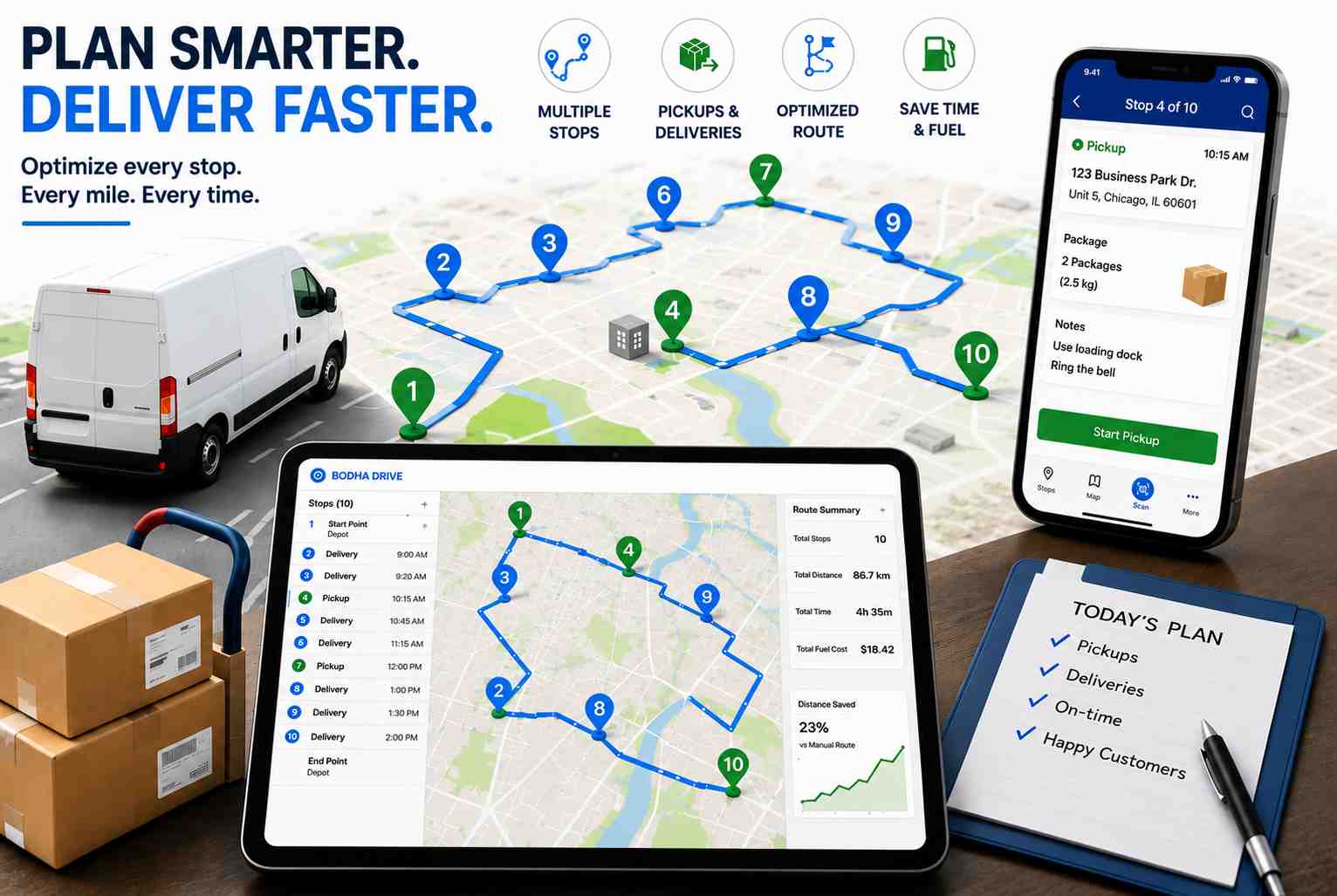
Ask ten dispatchers how to plan a courier route and you will get ten different answers, most of them involving a spreadsheet, a maps tab, and a fair bit of guesswork. Courier work is its own animal. You are not running one tidy set of drop-offs like a pizza shop. You have pickups and deliveries mixed into the same run, parcels that need scanning, gate codes buried in notes, and a customer who books a same-day collection at 3pm when the van is already halfway across town. This guide walks through how to plan a courier route with multiple stops in a way that survives a real day, not just a neat plan on paper.
By the end you will have a repeatable method you can run every morning, whether you are a solo owner-driver clearing your own list or a dispatcher juggling fifteen vans. We will cover what makes courier routes different, the exact steps to build one, the small mistakes that quietly bleed time and fuel, and where software takes over from the spreadsheet.
Why planning a courier route is different from other delivery routes
Most “plan your delivery route” advice treats every stop as the same: a fixed address you drive to and drop at. Courier routing breaks that assumption in five ways, and if your process ignores them, the route falls apart by mid-morning.
Pickups and deliveries share the same run. A parcel courier rarely does deliveries only. You collect from a warehouse or a customer, then deliver somewhere else, sometimes with the collection and the drop on the same route. Logistics people call this a pickup and delivery problem, and it matters because a pickup has to happen before its matching delivery. Sequence them wrong and a driver is holding a parcel they were supposed to collect two stops later, or worse, arriving at a delivery empty-handed.
The drops are dense and clustered. Courier runs are high volume. Sixty, a hundred, two hundred stops in a shift is normal, often packed into a few postcodes or ZIP zones. That density is an opportunity. Plan it well and a driver clears a whole street before moving on. Plan it badly and they cross the same neighbourhood four times, burning fuel and daylight on distance that added nothing.
New stops land after the van leaves. Same-day and on-demand work means your list is never final. The 4pm urgent collection is the one that blows up a badly built afternoon. A good courier route leaves room to slot in a stop without rebuilding everything from scratch, so one phone call does not undo an hour of planning.
Time windows overlap and fight each other. “Before noon,” “after 2pm,” “business hours only,” “not during the school run.” String enough of these together and the constraints start to contradict. Sequencing has to respect them, not just chase the shortest distance, because a fast route that misses three windows is a slow route in disguise once you count the redeliveries.
Every stop carries parcel-level detail. Barcodes, package sizes, signature required, leave-safe instructions, gate codes, buzzer numbers, which entrance to use. This detail has to travel with the stop to the driver, or you get failed attempts and a stream of “where do I leave it” calls that pull the driver and the office off task.
Keep those five in mind and the steps below make a lot more sense.
How to plan a courier route with multiple stops: the step-by-step
Step 1: Build one clean stop list
Everything starts with the data. Pull every job for the run into a single list before you sequence anything. For each stop you want the full address, whether it is a pickup or a delivery, the time window, the parcel reference or barcode, and any access note such as a gate code, floor number, or “ring twice.”
The fastest way to do this at volume is to import your stops from a spreadsheet or straight from your order system, rather than typing addresses one by one. Bad or missing addresses are the single biggest cause of a wrecked route, so validate them now, not when the driver is parked outside a building that does not exist. Five minutes of cleanup here saves an hour of chaos later.
Step 2: Group by area, not by the order jobs came in
The instinct is to plan stops in the order they were booked. Resist it. Booking order has nothing to do with geography. Instead, group your stops into clusters by neighbourhood, postcode, or ZIP zone. You are trying to give each driver a tight patch they can work through cleanly rather than a scattered list that sends them back and forth across the city.
If you run more than one driver, this is also where you split the work. Balance the clusters so no single driver is overloaded while another finishes at lunchtime with nothing left to do. Aim for zones that roughly match how your drivers already picture the map, since a plan that fights their local knowledge tends to get quietly ignored on the road. Even, sensible zones are the foundation everything else sits on.
Step 3: Sequence pickups and deliveries together
Now order the stops inside each cluster. This is the part manual planning gets wrong most often, because you have to hold two things in your head at once: the shortest sensible path, and the rule that a pickup comes before its matching delivery.
Work the run so collections feed naturally into the drops that follow. If you are collecting three parcels from a depot and delivering them across one suburb, the depot pickup obviously leads. Where pickups and deliveries are independent, weave them so the driver is never doubling back for a collection they passed an hour ago. Done right, the route reads like a loop rather than a scribble.
Step 4: Layer in the time windows and priorities
With a rough sequence in place, force it to respect the promises you made. Slot the “before noon” jobs into the morning leg. Flag priority or express parcels so they are not sitting at the back of the run. When two windows clash, the tighter or higher-value one wins, and the rest of the sequence bends around it.
This is exactly where a spreadsheet starts to creak. Every time you move one stop to hit a window, the knock-on effect ripples through the whole list, and you are re-checking the entire thing by eye. Miss one and you find out at 11:58 when the driver is three streets away.
Step 5: Account for the real-world limits
A route that looks perfect on a map can still fail in the van. Check it against the constraints that actually apply: how much the vehicle can carry, how long the driver’s shift is, service time at each stop (a signature-required medical drop takes longer than a leave-safe parcel), and current traffic. A courier route that ignores load capacity or shift length is a route that ends in unpaid overtime or a second trip back to base to reload. It is also worth checking the vehicle suits the run, because a large van sent down narrow residential streets loses time on every turn.
Step 6: Leave room to re-optimize mid-shift
Because new stops will land, build the run so it can flex. When that 4pm collection comes in, you want to drop it into the nearest point on an existing route and re-sequence the tail of the day, not tear up the whole plan. The ability to re-optimize on the fly is the difference between absorbing a surprise and being derailed by it. It is also the difference between saying yes to a lucrative last-minute job and turning it away.
Step 7: Dispatch with everything the driver needs on one screen
The route only pays off if the driver can follow it without ringing you. Each stop should reach their phone with turn-by-turn navigation, the parcel details, and those access notes from Step 1. Let them scan each parcel so the right package is matched to the right stop, which kills a whole category of mis-delivery before it happens. A good driver mobile app puts navigation, notes, and scanning in one place so the driver is not juggling three tools at the kerb.
There is one step between planning and driving that is easy to overlook: how the van gets loaded. A vehicle loading plan turns the sequenced route into a loading order, tells the driver where each parcel should sit, and has them load in reverse delivery order so the first stop is at the rear door and comes out first. On a dense run that saves a minute or two of digging at every single stop, which adds up to a lot of daylight over a hundred drops.
Step 8: Capture proof, notify customers, then review
As drivers work the run, they should capture proof of delivery at each drop: a photo, a signature, a GPS-stamped record. That evidence settles “I never got it” disputes in seconds. Meanwhile, automatic customer ETAs cut down the “where is my parcel” calls that eat your afternoon. And because you can track drivers in real time, you can answer a client’s question without calling the driver at all.
At the end of the day, look back. Which stops ran long? Where did drivers double back? Which windows nearly slipped? That five-minute review is how next week’s routes get tighter, and it compounds over a month into real savings.
Common courier route planning mistakes to avoid
Even experienced operators fall into the same traps. A few worth naming:
Planning in booking order. Covered above, but it is worth repeating because it is the most common one. The order jobs arrive in is almost never the order you should drive them.
Overloading the “best” driver. Handing your fastest driver the biggest zone feels efficient, until they are still out at 7pm while the newer driver sat idle from four. Balance by workload, not by who you trust most.
Ignoring service time. Two routes can have the same mileage but wildly different finish times if one is all quick letterbox drops and the other is full of buzzer-and-wait apartment deliveries. Build the time-at-stop into the plan.
Treating access notes as optional. A gate code left in an email instead of on the stop is a failed delivery waiting to happen. If the driver cannot get in, the parcel comes back, and you pay to send it again tomorrow.
Planning once and never reviewing. The best routes are refined, not invented. If you never look at what actually happened versus what you planned, you keep repeating the same detour every single week.
Planning by hand vs using software
You can absolutely plan a courier route by hand, and plenty of small operators do. For a dozen well-clustered stops it is fine. The trouble starts when volume climbs. Manual sequencing does not scale, because every constraint you add (a window, a pickup-before-delivery rule, a driver’s capacity) multiplies the number of possible orderings a human has to weigh. By around thirty stops, no one is finding the best route on a spreadsheet. They are finding a route that is good enough and hoping.
A route planner for courier delivery does the sequencing math in seconds and holds all those constraints at once. That is the entire reason the category exists, and it is why operators who adopt it rarely go back to the spreadsheet.
How Bodha plans courier routes
Bodha was built for this exact workflow. You import a manifest, and the courier delivery route planner sequences hundreds of pickups and deliveries across your whole fleet in under a minute, working around traffic, time windows, and what each driver can carry. When a stop gets added or the traffic shifts, it re-optimizes without you starting over.
Which product you use depends on how you operate. If you are a solo owner-driver planning your own day, Bodha Drive gives you fast multi-stop optimization and navigation on the phone. If you dispatch a team, Bodha Fleet adds multi-driver planning, live tracking, and a dispatcher dashboard so you can assign and rebalance work across every van from one screen. Either way, drivers get the route with navigation, parcel scanning, access notes, and proof of delivery built in, customers get automatic ETAs, and you can see the whole run on a live map. It is the eight steps above, minus the spreadsheet gymnastics. You can see the plans on the pricing plans page, and there is a free trial if you want to run a real day of your own stops through it first.
If you are still setting up your operation, it is worth reading our guide on starting a courier business, and if you are weighing tools, our rundown of the best route planner apps for couriers compares the main options fairly.
Plan your next courier route in seconds
You do not need a spreadsheet and three map tabs to build a clean run. Bodha’s courier delivery route planner sequences your pickups and deliveries in seconds, loads the van in the right order, and puts navigation, parcel scanning, and proof of delivery in the driver’s hand.
Start your free 7-day trial (no card required) or book a quick demo and run a real day of your own stops through it.
Frequently asked questions